•TUIO devices allow Vertex to exchange touch and object-tracking data with external hardware and software by using the OSC-based TUIO protocol.
•Use a TUIO Receiver device to receive TUIO data from another application or TUIO-capable device in the network.
•Use a TUIO Sender device to send touch data from Vertex to another system or application.
Interactive VERTEX projects require the TUIO Sender to be used in conjunction with the TUIO Injector. The Sender forwards touch data to the Injector, which receives and processes the input and maps it into a defined touch area on the target system.
This allows VERTEX touch input, for example from a LIDAR installation, to control touch-enabled applications as well as third-party applications that are designed for mouse input. Depending on the configuration, touch input can be processed as touch, mouse, middle-button, or right-button input.
 Vertex forwards touch input points. It does not provide native touch-gesture recognition. Gesture interpretation, such as pinch or zoom, is handled by the destination application. However, equivalent behavior can be built in VERTEX with nodes and scripting, if needed.
Setup
1.When working in Session Mode, identify the VERTEX system that renders the Clip Container for TUIO use.
2.Add the TUIO device on that same system ( Library > Devices > TUIO Sender / Receiver )
3.Configure the TUIO device in the inspector and verify the IP address, port, and network adapter:
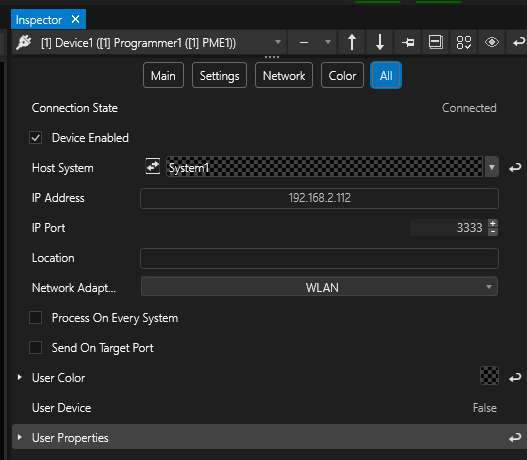
4.When using a TUIO Sender device, make sure the TUIO Injector is running on the same system.
5.Test touch alignment after changing the Clip's transform properties on Canvas.
When using TUIO data in Clip Containers, the TUIO device must be hosted locally on the same system that renders the clip. If the clip is rendered on another system, or if the TUIO device is hosted remotely, the touch data is not sent to that device.
 Do not rely on Canvas routing alone when sending TUIO data from a clip container to a TUIO device.
Canvas can route and scale visual content. TUIO delivery depends on the local rendering host, because Vertex sends TUIO data from the rendering system only.
Starting and stopping the TUIO Injector
The Vertex TUIO Injector is a local helper process used for Vertex TUIO Sender workflows.
1.Start or stop it from the Vertex Service menu in the Windows system tray.
2.Once started, access the settings window by selecting the TUIO Touch Injector icon from the system tray.
3.In the Injector, define the active touch region by setting Width, Height, X Offset, and Y Offset in pixels.
4.Enable UDP communication and confirm that the port matches the TUIO Sender configuration.
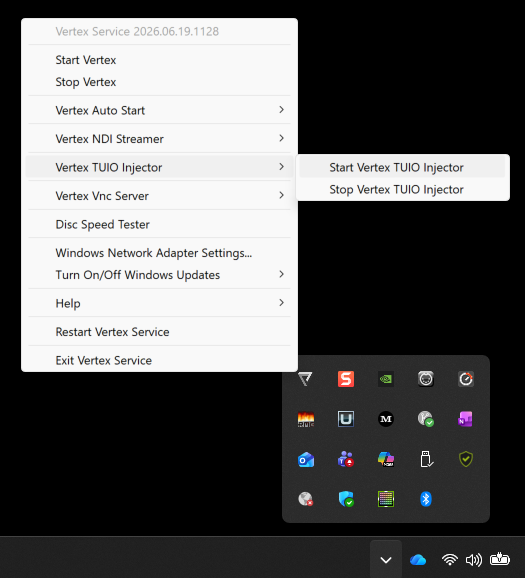
For Clip Container workflows, make sure the TUIO Injector is running on the same system that hosts the TUIO Sender device and renders the clip.